

8. Inspect Typography
The full operational, safety, workflow, reporting, locale, and issue reference.
8.1 Typography profiles
A profile configures the existing checkboxes, locale mode, and semantic strictness. You can edit any checkbox after applying a profile; manual changes return the profile state to Custom / Manual.
| Profile | Intended use |
|---|---|
| Custom / Manual | Keeps manually chosen settings and applies no preset changes. |
| Conservative Proofing | Minimum false positives for client-facing proofing. Emphasizes clear text errors and basic semantic consistency. |
| Editorial Strict | Long-form editorial QA with strong Micro, Semantic, rhythm, and Break Audit coverage. Rivers are enabled and can be expensive. |
| Corporate Report | Business, finance, numbers, currencies, abbreviations, style consistency, column balance, and Break Audit QA. |
| Magazine Layout | Broad visual layout QA for rag, spacing, hierarchy, measure, grid, font use, and style consistency. |
| Multilingual QA | Locale-sensitive punctuation, spacing, dates, numbers, abbreviations, quotes, currency, and hyphenation QA. |
| Deep Audit | Maximum internal coverage. Enables all major categories and strict semantic analysis. Expect the longest run and the most findings. |
Recommendation: Begin with Conservative Proofing for a client proof, Corporate Report for data-heavy business documents, Editorial Strict for long-form books or articles, and Deep Audit only when you are prepared to review a large result set.
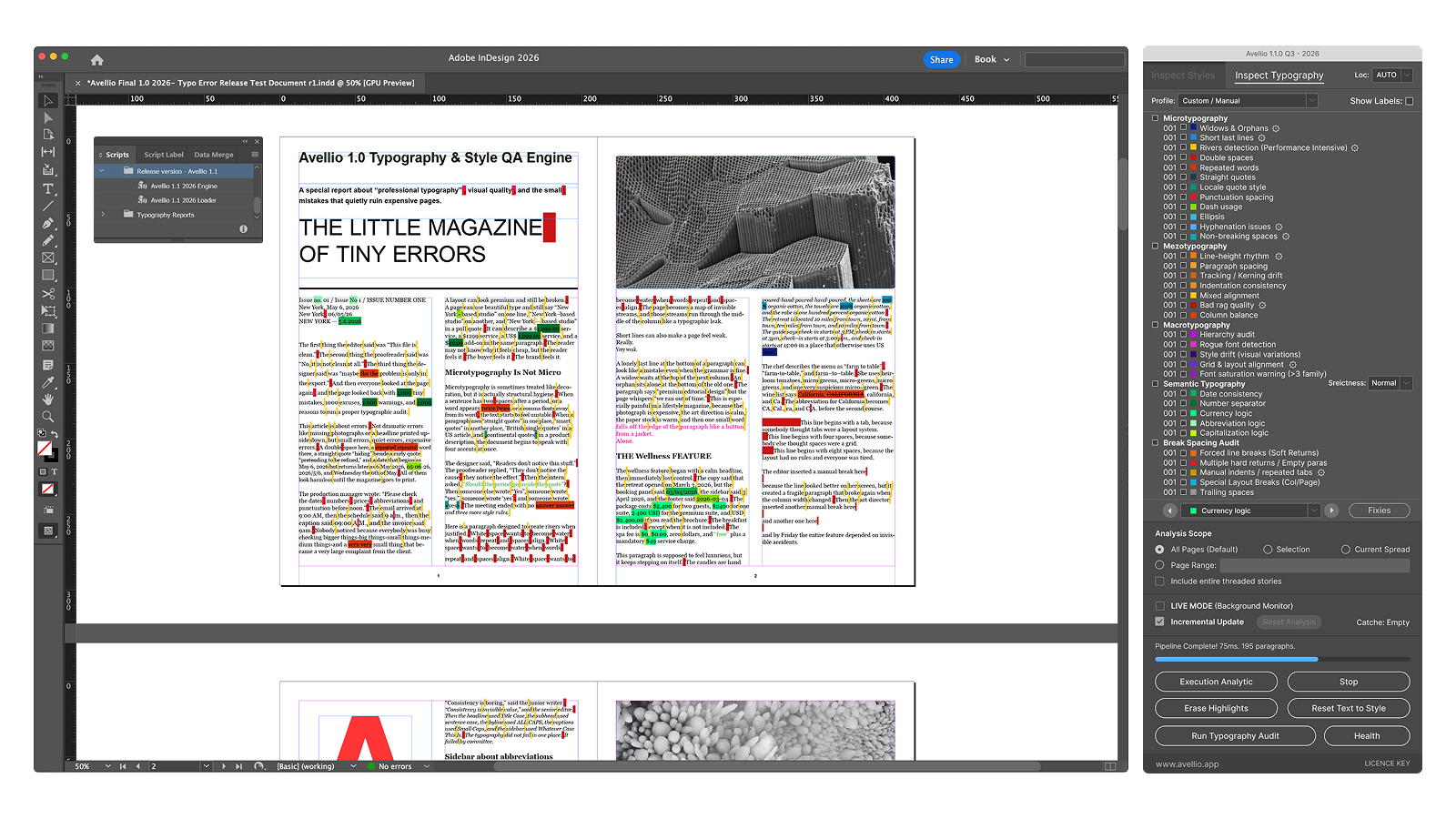
8.2 Locale selection
The Loc: menu controls the language or regional convention used by locale-aware checks.
 AUTO reads the InDesign language applied to each paragraph. A recognized regional language selects its matching profile; an unresolved language falls back to conservative English International behavior (
 EN Intl).
- An explicit locale applies one convention to every eligible paragraph in the selected analysis scope. It does not change the paragraph language stored in InDesign.
- Changing locale does not update an existing result; rerun the audit.
Locale affects quote style, punctuation spacing, date interpretation, number separators, currency conventions, abbreviations, unit spacing, and applicable short-preposition logic. Exact behavior still depends on the issue type and available context.
English International is intentionally conservative. US and UK profiles use concrete regional conventions. Swiss profiles combine language rules with Swiss regional conventions.
Country flags identify the regional convention, not the language itself. AUTO, English International, and Spanish Latin America therefore use neutral Avellio region symbols rather than a national flag. The adjacent locale code and written label are always authoritative.
See Chapter 16 for the complete profile matrix, regional comparisons, detection boundaries, and locale-aware correction policy.
8.3 Semantic strictness
Semantic checks provide Conservative, Normal, and Strict sensitivity. Strictness influences how readily Avellio reports patterns such as date, number, currency, abbreviation, and capitalization inconsistencies.
Higher strictness increases coverage and usually increases the need for editorial review.
8.4 Diagnostic labels and counters
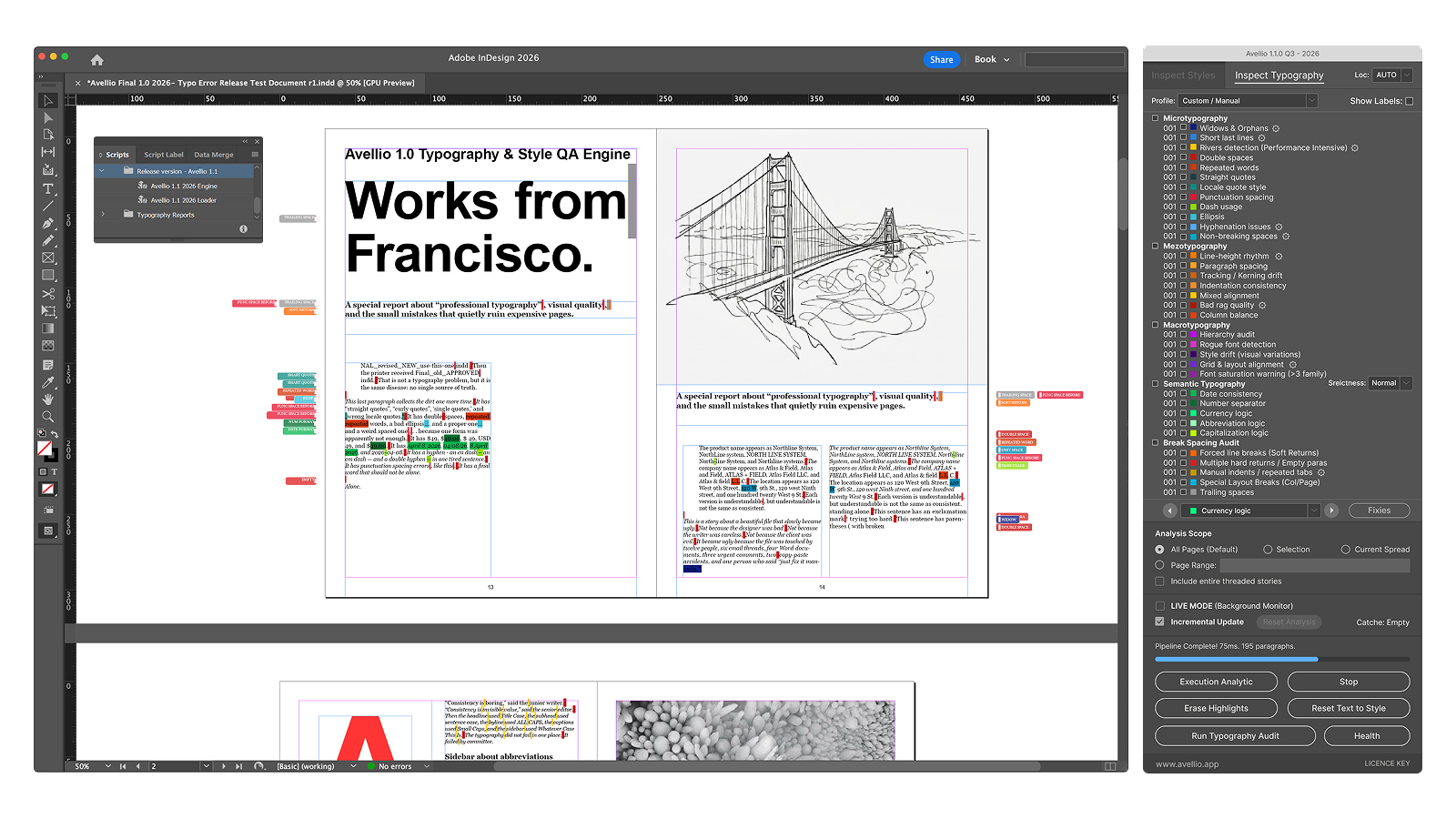
Each typography row has a color swatch, issue counter, checkbox, and explanatory tooltip. Rows with a gear control expose relevant settings through Configure Limits. The Microtypography header also provides Show Labels.
Some visible rows combine several related issue types. For example, Punctuation spacing includes both space-before and missing-space-after findings. Therefore the user interface has 34 rows while the engine can report 43 distinct issue identifiers.
The colored squares below reproduce the Engine's current diagnostic RGB values. They identify issue type, not severity: two different findings can share a color, and a bright color does not automatically mean that a finding is safe to fix.
8.5 Microtypography checks
| UI row | What it detects | Typical response |
|---|---|---|
| Widows & Orphans | Isolated lines and extremely short paragraph endings. | Edit copy, adjust Keep Options or spacing, and review composition. |
| Short last lines | Last lines below the configured percentage of frame width. | Rewrite, adjust composition, or apply a deliberate line break. |
| Rivers detection | Vertically aligned inter-word spaces across consecutive lines. | Review justification, measure, tracking, or copy. Use selectively because it is geometry-intensive. |
| Double spaces | Repeated normal spaces in prose. | Safe Clean can collapse clear cases. |
| Repeated words | Adjacent identical words. | Editorial review; delete only when repetition is accidental. |
| Straight quotes | ASCII quotation marks or apostrophes in typographic prose. | Exact apostrophe or quote cases may enter Review Queue; ambiguous pairs remain manual. |
| Locale quote style | Quote marks inconsistent with the resolved locale. | Apply the locale convention after reviewing nesting and direction. |
| Punctuation spacing | Space before punctuation, missing space after punctuation, or repeated punctuation. | Clear safe cases may be fixed; French punctuation and ambiguous contexts are guarded. |
| Dash usage | Hyphen-minus used as a dash, prose separator, or numeric range. | Clear numeric ranges can be fixed safely; prose dashes require review. |
| Ellipsis | Three periods used where a single ellipsis is expected. | Safe Clean can replace an exact plain three-dot sequence. |
| Hyphenation issues | Consecutive hyphenated line endings above the configured limit. | Edit copy or adjust hyphenation/composition settings. |
| Non-breaking spaces | Number-unit spacing and applicable short prepositions/conjunctions at line ends. | Clear units can be fixed safely; Czech/Polish prepositions require Review Queue. |
8.6 Mezotypography checks
| UI row | What it detects | Typical response |
|---|---|---|
| Line-height rhythm | Leading that deviates from the document norm or expected vertical rhythm. | Correct style definitions or review an exact local leading reset. |
| Paragraph spacing | Inconsistent Space Before or Space After values. | Normalize style definitions or review an exact local reset. |
| Tracking / kerning drift | Significant local spacing overrides. | Clear exact unintended ranges or capture intended behavior in a character style. |
| Indentation consistency | First-line or left-indent differences from the established pattern. | Correct styles or review an exact local reset. |
| Mixed alignment | Inconsistent alignment or justification within a text flow. | Confirm the design intent and normalize styles where appropriate. |
| Bad rag quality | Large adjacent line-length variation in non-justified text. | Edit copy, adjust measure or composition, and avoid mechanical fixes. |
| Column balance | Uneven ending depth across columns. | Use Balance Columns, edit copy, or adjust frame and paragraph settings. |
The engine can report related subtypes such as vertical-rhythm findings even when several results are represented by one UI row.
8.7 Macrotypography checks
| UI row | What it detects | Typical response |
|---|---|---|
| Hierarchy audit | Heading-like styles whose size or visual role conflicts with body text. | Correct the style hierarchy after editorial review. |
| Rogue font detection | Local font family differences from the paragraph style. | Exact range-level cases may be reset through Style Cleanup. |
| Style drift | One style appearing in multiple visual variants, including faux-small-caps evidence. | Review the variants and normalize the design system manually. |
| Grid & layout alignment | Frame placement, optical-margin, or text-measure evidence outside the configured expectation. | Align frames, review story settings and measure, or confirm an intentional exception. |
| Font saturation warning (>3 family) | More than three font families in the analyzed document. | Consolidate fonts when the diversity is not intentional. |
Additional underlying macro findings can include optical-margin, measure, faux-small-caps, and related structural checks. These may be represented in the report even when consolidated under a broader UI row.
8.8 Semantic Typography checks
| UI row | What it detects | Typical response |
|---|---|---|
| Date consistency | Mixed or locale-inconsistent date patterns. | Select one intended convention. Automatic conversion remains preview-only because date order can be ambiguous. |
| Number separators | Mixed thousands or decimal separator conventions. | Normalize after confirming locale and numeric meaning. Conversion is preview-only. |
| Currency logic | Inconsistent currency placement or spacing. | Review locale and accounting requirements. Conversion is preview-only. |
| Abbreviation logic | Mixed punctuation or forms for comparable abbreviations. | Apply the editorial style guide manually. |
| Capitalization logic | Inconsistent heading capitalization patterns. | Normalize through copy or styles after confirming hierarchy. |
8.9 Break & Spacing Audit checks
| UI row | What it detects | Typical response |
|---|---|---|
| Forced line breaks (Soft Returns) | Shift+Enter characters that can make text reflow fragile. | Review individually before removal or replacement. |
| Multiple hard returns / Empty paras | Empty paragraphs used as spacing. | Review individually and replace with style spacing where appropriate. |
| Manual indents / repeated tabs | Repeated spaces or tabs used for indentation/alignment. | Review individually; convert intentional layout to paragraph or tab settings. |
| Special Layout Breaks (Col/Page) | Column, frame, or page break characters. | Manual-only because they may intentionally control flow. |
| Trailing spaces | Spaces or tabs at line or paragraph ends. | Clear normal whitespace can enter Safe Clean; protected spaces are guarded. |
Repeated tabs are an underlying issue type represented within the manual-indent row.
8.10 Configure Limits
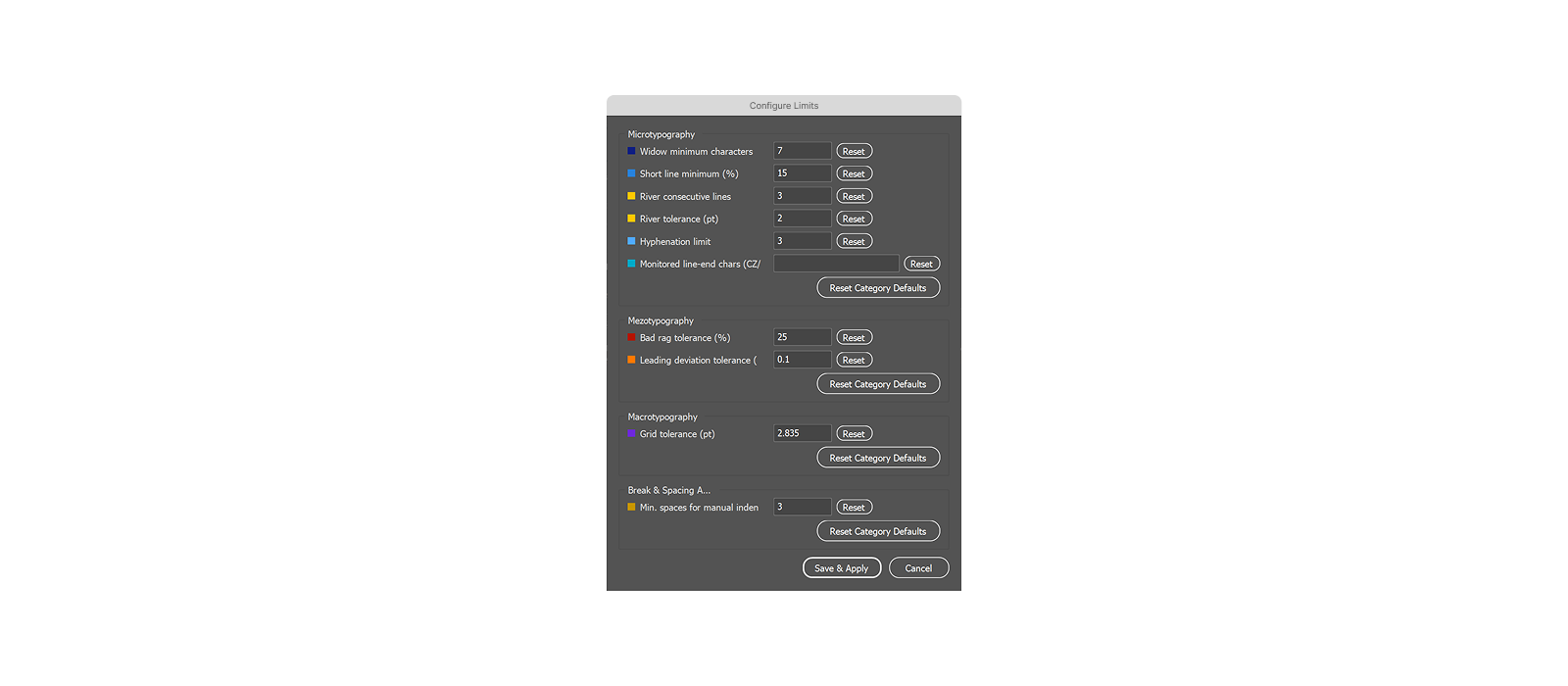
Use the gear controls beside supported rows to open Configure Limits. Settings are saved with Avellio preferences.
| Category | Setting | Default |
|---|---|---|
| Micro | Widow minimum characters | 7 |
| Micro | Short line minimum | 15% |
| Micro | River consecutive lines | 3 |
| Micro | River tolerance | 3 pt |
| Micro | Hyphenation limit | 3 lines |
| Micro | Monitored line-end characters (CZ/PL) | v,k,s,z,o,u,i,a |
| Mezo | Bad rag tolerance | 25% |
| Mezo | Leading deviation tolerance | 0.1 pt |
| Macro | Grid tolerance | 2.835 pt (approximately 1 mm) |
| Break Audit | Minimum spaces for manual indent | 3 |
Each category has Reset Category Defaults. Use Save & Apply to commit valid values or Cancel to discard the dialog changes.
Avoid lowering tolerances merely to increase issue counts. Tune thresholds to the template, measure, language, and editorial standard.
Release sourceThis page was generated from the Markdown companion of the verified distribution PDF.