

1. What Avellio does
The full operational, safety, workflow, reporting, locale, and issue reference.
Avellio is a document-quality system that runs inside Adobe InDesign. It exposes two complementary inspection tracks.
1.1 Inspect Styles
The Styles track reveals how paragraph styles, character styles, and local formatting are used. It can:
- map style frequency with a heatmap;
- apply fast native diagnostic shading;
- draw legacy rectangle overlays;
- detect local formatting overrides with configurable sensitivity;
- inspect paragraph and character style usage independently;
- display style names directly in the document;
- identify critical, geometric, styling, and structural inconsistencies;
- summarize style hygiene, duplicate patterns, overrides, and document assets;
- navigate style findings and export an Override Report.
1.2 Inspect Typography
The Typography track audits editorial, typographic, layout, semantic, and break-related problems. It includes:
- seven workflow profiles;
- Auto locale resolution and 34 explicit language or regional profiles;
- Microtypography, Mezotypography, Macrotypography, Semantic Typography, and Break & Spacing Audit categories;
- 34 visible control rows representing 43 underlying issue types;
- configurable analysis thresholds;
- counters, diagnostic colors, optional labels, and issue navigation;
- adaptive Live Mode and cached Incremental Updates;
- a guarded Action Layer with Safe Clean, Review Queue, locale-aware corrections, style cleanup, and manual-only recommendations;
- Typography, Override, and Fix reports.
1.3 Analysis, diagnostics, and corrections are separate
Avellio performs three different kinds of work:
- Analysis reads document structure and records findings.
- Diagnostic rendering makes findings visible using conditions, shading, underlines, or overlays.
- Corrective actions intentionally change text or local formatting after explicit user confirmation.
This distinction matters. Analysis does not rewrite document content or style definitions. Some diagnostic modes do add reversible document objects or local visual formatting. The Action Layer changes document content or formatting by design.
1.4 Recommended production sequence
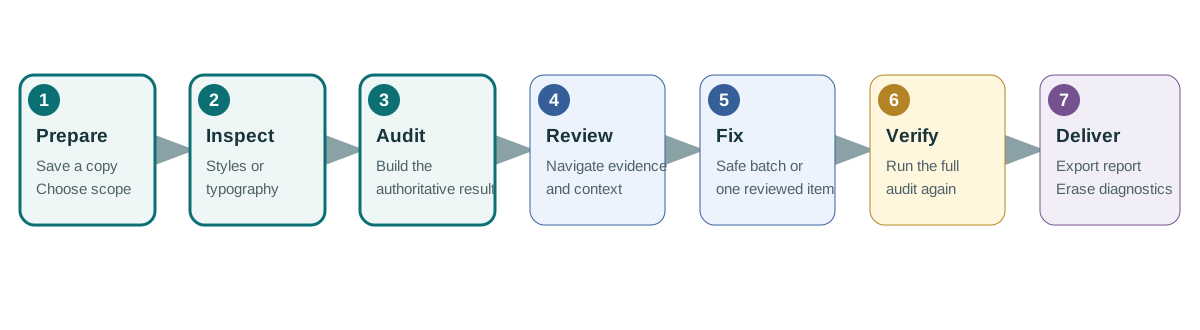
- Save and duplicate the InDesign document.
- Launch Avellio while the intended document is active.
- Choose the correct track, scope, profile, and locale.
- Run Execute Analytics for visual inspection or the appropriate full Audit for an authoritative report.
- Review and navigate the findings.
- Open Fixes only after a Typography Audit.
- Apply safe fixes, review contextual fixes individually, and resolve manual-only issues in InDesign.
- Run the full audit again.
- Export the required reports.
- Erase diagnostics and inspect the document before delivery.
Release sourceThis page was generated from the Markdown companion of the verified distribution PDF.