

Start here
Install Avellio, run a first audit, review findings, fix safely, and verify the result.
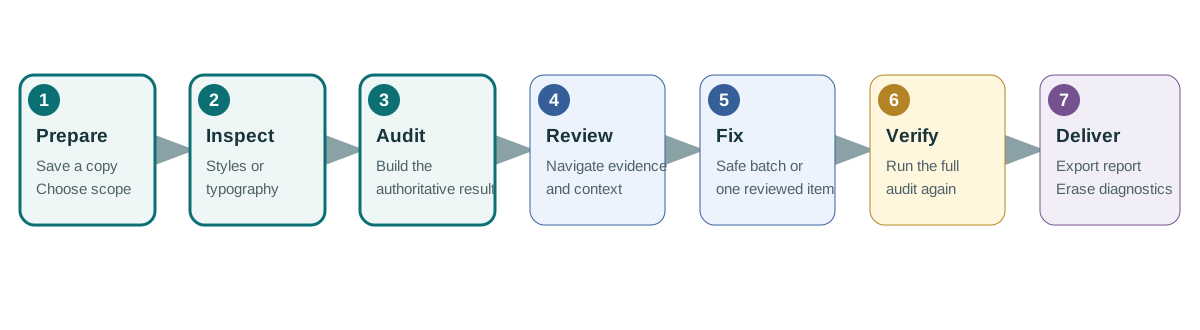
This guide takes you through a first safe Avellio session: install the Loader + Engine package, inspect styles, run a Typography Audit, review guarded fixes, export a report, and remove diagnostics before delivery.
Allow approximately 10–15 minutes for a small document. Large or complex publications can take longer.
Essential rule — Audit first. Fix second. Work on a saved duplicate, use the full Typography Audit before opening Fixes, and rerun the audit after any corrections.
If you remember only five things
- Launch Avellio with the intended document already active.
- A finding is evidence, not an instruction to change the document.
- Live Mode is editing feedback; the full audit is the final authority.
- Safe Clean performs only six guarded actions.
- Erase Highlights is normal cleanup; Reset Text to Style is not.
What you will complete
- Install and launch Avellio correctly.
- Run a reversible diagnostic style inspection.
- Run a conservative typography audit.
- Navigate detected issues.
- Apply only guarded Safe Clean actions or individually reviewed fixes.
- Export the final report.
- Erase all Avellio diagnostics before delivery.
You are finished when the final audit is current, the required reports are exported, and a clean proof PDF contains no Avellio diagnostic rendering.
Release sourceThis page was generated from the Markdown companion of the verified distribution PDF.