
5. Review and navigate findings
Install Avellio, run a first audit, review findings, fix safely, and verify the result.
REVIEW Goal: understand the evidence before deciding what is intentional, safe to fix, or better handled in InDesign.
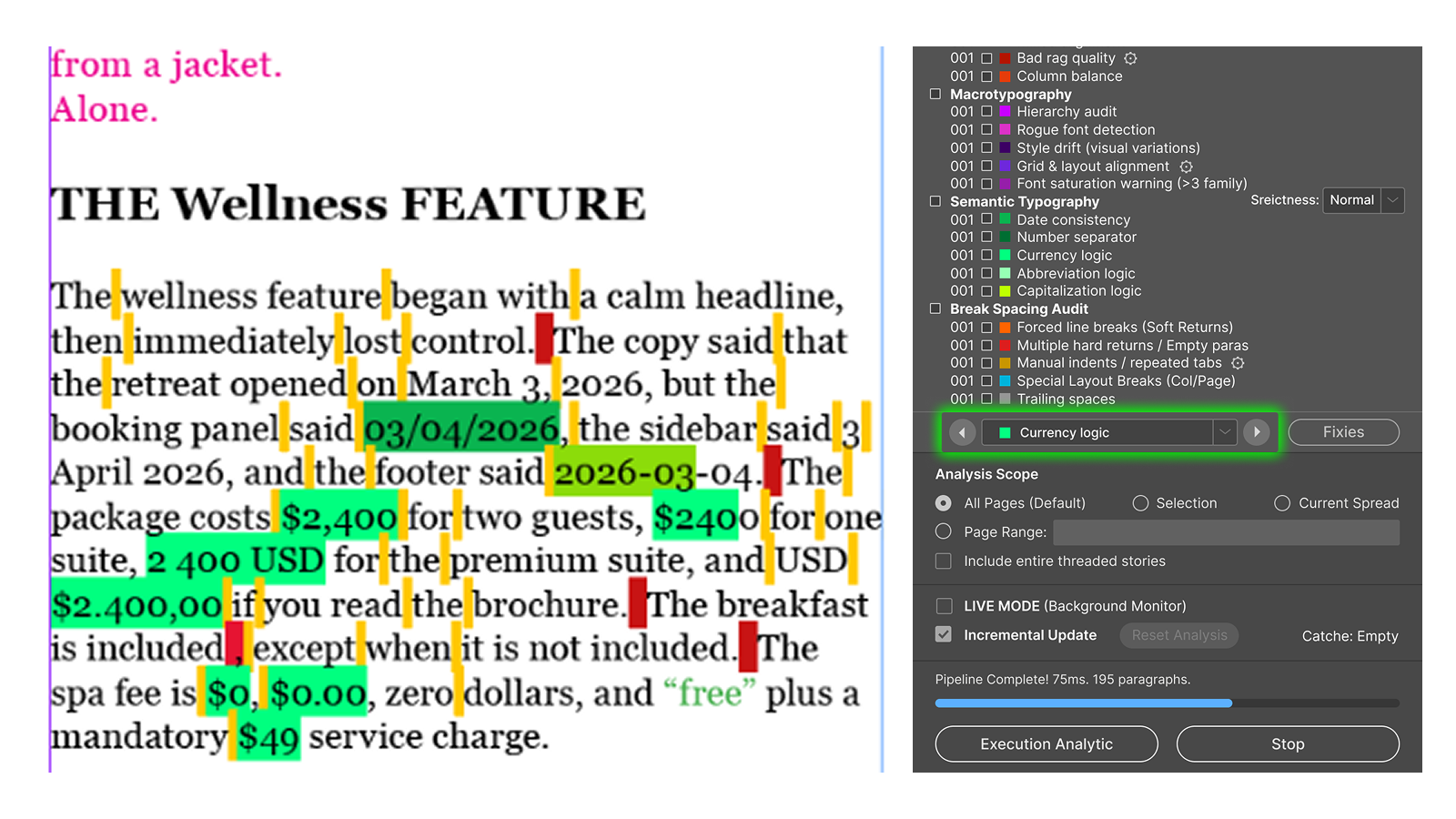
At the bottom of the Typography list, use:
- the issue-type menu to choose a finding;
- the left and right arrows to move through occurrences;
- the color indicator to match the diagnostic color;
- Fixes to open the guarded Action Layer after the audit.
Navigation selects the relevant content and zooms into the issue. Read the complete sentence or paragraph and check the surrounding layout before deciding whether a finding is intentional.
Recognize the most common diagnostic colors
The square beside a name matches the diagnostic color used by Avellio in InDesign. Color identifies issue type, not severity or automatic-fix safety.
| Color and finding | What to remember |
|---|---|
| Widow / Orphan | Dark navy and bright cyan are related line-isolation findings. |
| Short last line | Royal blue identifies a weak short paragraph ending. |
| River | Golden yellow follows the visible white-space trail. |
| Double space | Brick red marks repeated normal spaces. |
| Repeated word | Vermilion marks adjacent duplicate words. |
| Straight / locale quote | Dark slate and teal distinguish quote families. |
| Punctuation spacing | Crimson and dark rose separate before/after spacing. |
| Ellipsis | Ice blue identifies ellipsis consistency. |
| Non-breaking-space findings | Steel cyan and aqua identify number-unit and short-word cases. |
| Bad rag | Deep orange-red marks uneven line endings. |
| Style drift | Dark plum marks repeated visual variants. |
| Trailing space | Neutral gray marks ordinary trailing whitespace. |
The User Manual, Chapter 17, provides the complete 43-identifier color reference with exact Hex values.
Results that usually need judgment
Always review rather than mechanically changing:
- widows, orphans, and short last lines;
- rivers and rag quality;
- repeated words;
- smart-quote pairing;
- manual line and layout breaks;
- dates, number formats, currencies, and abbreviations;
- hierarchy, style drift, font saturation, and grid exceptions.
Success looks like: you have navigated at least three findings and can explain why each one is an error, an accepted exception, or a manual design decision.
Release sourceThis page was generated from the Markdown companion of the verified distribution PDF.